


Cars.com: Buy and sell cars
4.720.78K Reviews
App Specs
- Version
- 26.20.0
- Updated On
- License
- Free
- Downloads
- 10,000,000+
- Developer
- Cars.com
- Categories
- Auto & Vehicles
- Platform
- Android, iOS
Screenshots




 Analysis by AppCompare
When I’m comparing cars, I want to be able to scan listings quickly, read the important details without losing my place, and come back to promising options later. Cars.com is built around that kind of shopping: it brings vehicle listings and seller details into one place, with tools for people buying as well as those preparing to sell. I find it most useful as a research companion, not as a substitute for inspecting a car or speaking directly with a seller.
Readable listings, with a few things to check
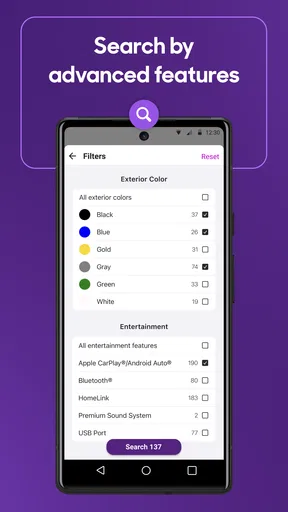
The app’s main job is helping you narrow a large field of vehicles. You can filter by make, model, price, and distance from your location, which makes the first pass less overwhelming than searching through a broad collection of classified ads. I’d begin with a realistic budget and a practical travel radius, then loosen one filter at a time if the results are too limited. That simple approach helps show whether your preferred model is genuinely scarce nearby or whether one of your requirements is doing most of the narrowing.
Listing photos and vehicle details make it easier to compare candidates without opening every result. Still, presentation varies from seller to seller. I look for consistent photos and clear information rather than assuming that an attractive listing tells the whole story. A polished gallery can help me decide whether a car is worth a closer look, but it cannot replace questions about its condition or an in-person inspection.
Navigation is centered on browsing rather than on a complicated setup process. That suits a quick search during a spare moment, though car shopping can involve lots of back-and-forth between listings, prices, and seller information. I recommend keeping a short note of the exact model year, trim, mileage, and questions you care about while comparing options. It is an easy way to avoid mixing up two similar cars when you return to the app later.
Useful in different situations, with practical limits
In my experience, the app is easier to use when I treat it as a shortlist builder. For example, if I need a family car, I can first focus on the body style and price range that make sense, then review the local choices and save the strongest candidates for a closer comparison. Someone replacing a car on a tight schedule may value having nearby listings in one place; a patient shopper can use the same search to watch how different vehicles compare before arranging visits.
There are a few sensible limits to keep in mind. A listing is only as complete as the information its seller provides, and photos cannot establish mechanical condition. Price comparisons are useful context, not proof that a particular car is fairly priced once its history, options, and condition are considered. I would use the app to prepare better questions and identify candidates, then verify details with the seller and arrange an inspection before making a decision.
The app also caters to people selling a vehicle, with a process for adding details and photos to an ad. That can be more convenient than starting from a blank page elsewhere, especially if you already have clear pictures and know the car’s specifications. The trade-off is that creating a useful listing still takes care: accurate details and photos that show the car honestly are more valuable than trying to make an ad sound impressive.
Worth Reading Before You Choose

Flipboard Shows What News Apps Must Do Beyond the Feed

Switching to Android Auto Means Rethinking Your Driving Routine

Google Calendar Makes a Crowded Week Easier to Manage

Ludo King Makes the Most of the Minutes Between Plans

Baby Panda World Brings Quick Play to Modern Phones, but Its Game Library Feels Busy

ESPN’s Live Game View Makes Following Close Games Easier
Who I’d recommend it to
I’d recommend Cars.com to people who want a focused way to browse vehicles, compare local possibilities, and gather information before contacting sellers. It is also a reasonable starting point for a private owner preparing to list a car. If you already know what you need, the filters can help turn a broad search into a manageable shortlist. If you are still deciding between very different types of vehicle, browsing can help you understand what is available, but you may need other research to settle questions about ownership costs or which model suits your routine.
It may be less suitable for someone who expects an app to certify a car’s condition, negotiate on their behalf, or make every listing equally trustworthy. I would also look elsewhere for a narrow search that depends on specialist vehicle knowledge or a particular sales process. General listing apps are strongest at discovery; a mechanic, a vehicle-history check, and a direct conversation with the seller answer different questions.
Finding Your Dream Car
First things first, the search feature on Cars.com is a total game-changer. You can sift through thousands of listings with ease. Whether you’re looking for a shiny new ride or a reliable used vehicle, the app’s got you covered. You can filter your search by make, model, price, and even the distance from your location. It's like having a personal assistant who knows exactly what you want.
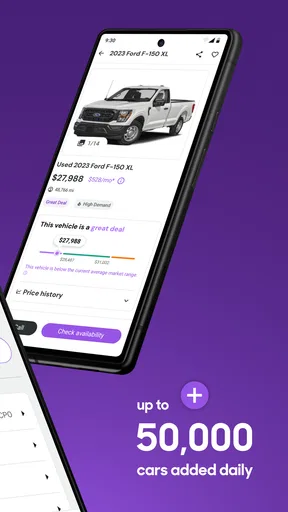
One of the standout features is the “Price Comparison” tool. This nifty feature lets you see how the car you’re eyeing stacks up against similar models in terms of price. So, you’ll know if you’re getting a sweet deal or if it’s time to negotiate a bit harder.
Seller Information and Reviews
Now, let’s talk about trust. Buying a car is a big deal, and you want to ensure you're dealing with reputable sellers. The app provides detailed seller information and even includes customer reviews and ratings. It’s like having a buddy vouch for the dealership before you even set foot in it.
If you're more of a visual person, the high-quality photos and 360-degree views of the vehicles are a real treat. You can practically smell that new car scent through your screen!
Selling Made Easy
Not looking to buy? No worries, Cars.com also has you covered if you’re looking to sell your car. Posting an ad is straightforward. You simply upload your car’s details and some snazzy pictures, and you’re good to go. The app even offers tips on how to make your listing more appealing to buyers.
Tools and Resources
For the car enthusiasts out there, the app is packed with resources. From car reviews, buying guides, to maintenance tips, it’s a treasure trove of information. You’ll feel like a car guru in no time.
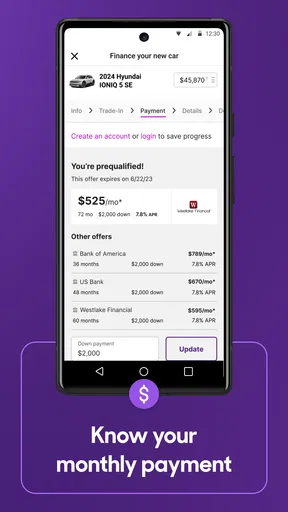
Plus, if you’re worried about financing, the loan and payment calculators are super handy. You can get a clear picture of what your monthly payments would look like, helping you plan your budget better.
When a search becomes an everyday task, small habits can make the results more useful. I would keep the first search broad enough to reveal nearby alternatives, then tighten it around the requirements that truly matter, such as price and distance. Before contacting a seller, I’d write down the questions that don’t appear clearly in the listing: what needs attention, whether the photos show the whole vehicle, and what paperwork is available. This turns browsing into a practical next step rather than a cycle of opening and forgetting listings.
A realistic example: I might check a few options during a lunch break, note two cars that fit my budget, and review their seller details later when I have time to call. On a second pass, I’d compare the asking prices with similar vehicles, then decide which seller deserves a visit. The useful part is not that the app makes the decision for me; it helps me spend time on the most promising candidates instead of driving around without a plan.
For a seller, the same careful approach pays off. I’d gather the vehicle’s details before starting the ad, take clear pictures in good light, and make sure the description matches what a buyer will see in person. The app’s listing tips can help with presentation, but accuracy matters more than sales language. If a detail is uncertain, it is better to check it before publishing than to create confusion during a buyer’s first conversation.
Accessibility in daily use depends partly on the phone and the person using it. A photo-heavy listing can be helpful for someone who prefers visual information, while another shopper may need to slow down and read specifications carefully. I would use the app in a calm setting for longer comparisons, rather than trying to judge a vehicle while walking or handling another task. If small text, glare, or dense vehicle details are difficult to manage, adjusting the phone’s display settings and reviewing fewer listings at a time may make the process more comfortable; those are general device adjustments, not a special accessibility feature I would assume the app provides.
There is also a sensory trade-off in how listings present information. Photos and 360-degree views can help someone inspect the visible interior and exterior at their own pace, but they are not a complete account of a car’s sound, smell, ride, or mechanical behavior. I would never let an appealing gallery settle a question that needs a test drive or a professional inspection. For buyers who prefer direct, hands-on evaluation, the app is best used to choose where to go, not to avoid going.
Compared with broad classified marketplaces, Cars.com feels more specifically organized around vehicle shopping, with car-focused filters, seller information, price context, and resources gathered alongside listings. A general marketplace may be preferable when you want to search across many kinds of goods or reach a particular local community. A dealership’s own site can provide details about its inventory and process, while Cars.com is more useful for looking across multiple possibilities. I’d use these sources together when the purchase is important, checking that the same vehicle details agree before making plans.
People often wonder whether they can make a decision from the app alone. My answer is no: it can help identify and compare candidates, but the seller’s information, vehicle condition, and final terms still need direct checking. It is also worth asking whether the app is useful if you are not ready to buy. I think it is, provided you treat browsing as research and do not mistake a current listing for a promise that the car will remain available. For selling, it can help prepare an ad, but you remain responsible for presenting the vehicle clearly and responding to interested buyers.
Cars.com is a free auto-and-vehicle app from Cars.com, and it has a 4.7 average from around 191,000 ratings. It has been available since March 2, 2011, and its current version is 9.67.0; it is rated Everyone and requires iOS 11 or later. Its reach—over 10 million installs—makes it a familiar option, but the deciding factor for me is whether its listings and tools suit the way I want to shop. I’d choose it for organized discovery and comparison, then bring in direct seller conversations and independent checks for the decisions that matter most.
In short, Cars.com makes the whole buying and selling process as easy as pie. It’s like having an entire auto show at your fingertips. So, whether you’re on the hunt for a new ride or looking to offload your old one, this app is your trusty sidekick.
Next time you’re in the market, give Cars.com a spin. You might just find yourself cruising down the highway in your dream car sooner than you think.
Pros
- Wide selection of new and used cars.
- User-friendly interface for easy browsing.
- Detailed vehicle information available.
- Integration with financing options.
- Customizable search filters.
Cons
- Occasional app crashes reported.
- Limited private seller listings.
- Some outdated car listings.
- Push notifications can be frequent.
- Requires stable internet connection.
FAQs for Cars.com: Buy and sell cars
What features does the Cars.com app offer for buying and selling cars?
The Cars.com app provides a comprehensive platform for both buyers and sellers. Buyers can browse a vast inventory of new and used cars, use detailed filters to narrow down options, and compare prices. Sellers can list their vehicles with ease, including uploading photos and detailed descriptions. In-app messaging allows for direct communication between buyers and sellers.
Is the Cars.com app free to use, and are there any in-app purchases?
The Cars.com app is free to download and use for browsing and listing vehicles. However, there might be optional in-app purchases or subscription services for enhanced features, such as premium listings or advanced search capabilities. These are designed to provide users with a more tailored and efficient experience.
How reliable are the listings and reviews on the Cars.com app?
Cars.com strives to offer reliable and up-to-date listings, with a verification process in place for dealer listings. User reviews and ratings are provided to help assess the credibility of sellers and the quality of vehicles. However, users should still perform due diligence, such as checking vehicle history and arranging inspections, before making a purchase.
What steps should I take to ensure a safe transaction on Cars.com?
To ensure a safe transaction, it's recommended to communicate through the app’s secure messaging system. Meet in a public and safe location for viewing and test driving the vehicle. It's also advisable to have the car inspected by a professional mechanic and use secure payment methods. Be cautious of deals that seem too good to be true.
Can I trade in my car using the Cars.com app?
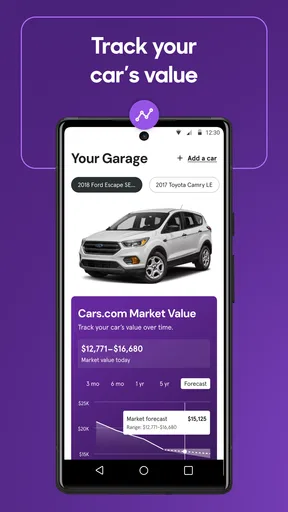
Yes, the Cars.com app offers a trade-in feature where you can get an estimate for your current vehicle's value. This can be used as part of your deal when purchasing a new or used vehicle through participating dealers. The app provides tools to estimate trade-in value, helping users make informed decisions during negotiations.


